
Record anything
A browser tab, one window or your whole screen, with system audio and your microphone mixed together.
Tab, window & screenOne click to record with system audio and your microphone, up to 4K at 60 fps. Export to MP4, WebM or GIF right in your browser. Nothing is uploaded.
No desktop app and no sign-up. It lives in Chrome’s side panel, right next to what you’re recording.
Add it from the Chrome Web Store, then pin it from the puzzle-piece menu in your toolbar.
Turn on system audio, your microphone or both. Add a 3 or 5 second countdown if you want one.
Pick a tab, window or screen in Chrome’s picker. Stop with ⌥⇧R, trim, and save as MP4 or GIF.
Click through a working copy of the extension in your browser: start a recording, trim it, pick a format and share it. It is a simulation, so nothing on your screen is recorded.
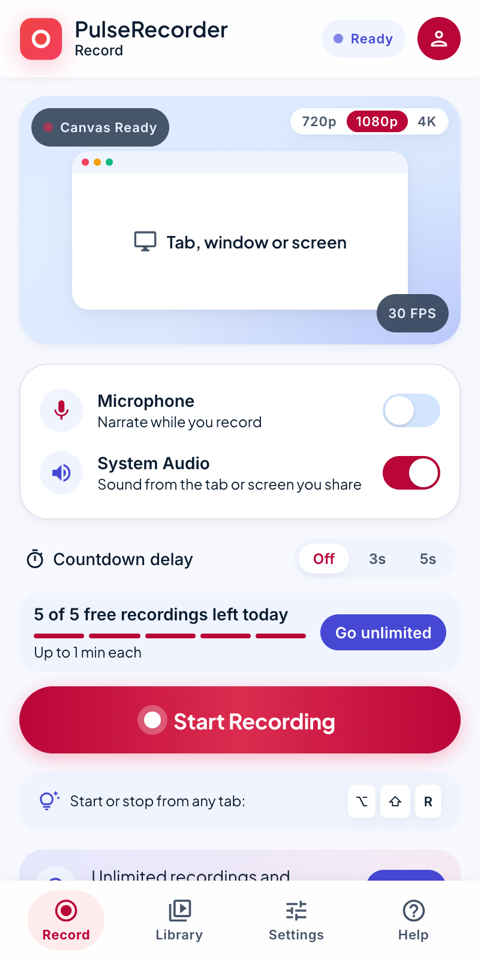 Try it live
Built for quick bug reports, tutorials, demos and meeting clips.
A browser tab, one window or your whole screen, with system audio and your microphone mixed together.
Tab, window & screenChoose 720p, 1080p or 4K at 15, 30 or 60 fps on every plan. MP4 recordings download instantly.
Every planCut the start and end, then export to MP4, WebM or a looping GIF with the frame rate and width you choose.
Built-in trimmerSave to Downloads on any plan. With Pro, send to Google Drive, OneDrive, X, YouTube or Gmail.
Local firstEvery recording is kept in your browser with a thumbnail, ready to search, rename, play and export again.
History & search⌥⇧R starts and stops recording from any tab. ⌥⇧P pauses and resumes with Pro.
Hands on keysMonthly, yearly or lifetime: same Pro features. Try Pro free for 7 days.
For quick clips and bug reports.
€0forever
No account or card needed.
Add to ChromeFor tutorials, demos and long recordings.
€17.99/ year
Billed yearly. Half the monthly price.
Start 7-day free trialPro: €2.99 / month · €17.99 / year · €25.99 lifetime. Secure checkout by Stripe through ExtensionPay.
| Feature | Free | Pro |
|---|---|---|
| Recordings per day | 5 | Unlimited |
| Recording length | Up to 1 minute | Unlimited |
| Quality | Up to 4K, 60 fps | Up to 4K, 60 fps |
| Export to MP4, WebM & GIF | check | check |
| System audio + microphone | check | check |
| Trim before export | check | check |
| Pause / resume | remove | check |
| Share to Drive, YouTube, Gmail… | Download only | check |
| Recording history | 7 days | Any length, or forever |
If Pro isn’t for you, ask within 14 days of paying and get your money back. No questions asked. Include the email you paid with.
Recording and conversion run inside Chrome on your machine. There’s no account, no cloud upload and no tracking. The only network call checks your Pro license.
Tutorials
Short step-by-step guides with real screens from the extension.
Pick a tab, a window or the whole screen, then start and stop.
Record the tab’s audio and narrate with your microphone.
Cut the start and end, then save as MP4, GIF or WebM.
Send to Drive, OneDrive, X, YouTube or Gmail in a couple of clicks.
Yes. Free gives you 5 recordings a day, up to a minute each, in up to 4K at 60 fps, with MP4, WebM and GIF export. No watermark, no account. Pro removes the limits and adds pause and sharing.
In your browser’s storage on this computer, listed in the extension’s history. Download them to your Downloads folder whenever you like.
Ask within 14 days of paying using the refund request link, with the email you paid with. You’ll get your money back.
Open Settings → Account → “Already paid? Log in” and use the email you paid with.
Chrome and other Chromium browsers such as Microsoft Edge. Firefox isn’t supported yet.
MP4 and GIF are converted on your own computer so nothing is uploaded. It takes roughly as long as the recording, and keeps running in the background.
Join the PulseRecorder community to ask a question, see which features are coming, tell us which ones you want, and follow each release.
Free forever for quick clips. Pro free for 7 days when you need more.
Add to Chrome — Free